Restaurant sales forecasting from your POS export
To know how much food to prep, forecast how many of each dish or item you will sell each day, then convert that into ingredients using your recipes. 4castPlannr does both from a POS export: a daily sales forecast tested on your history, and an ingredient order plan around your delivery days and pack sizes. It also handles messy exports.
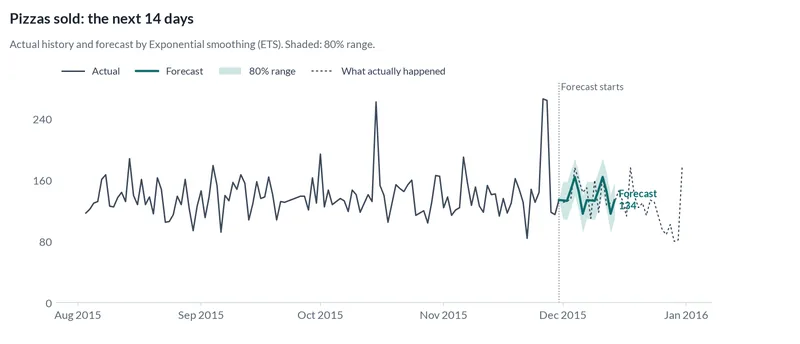
The decision you make every week
Each day you decide how much dough, protein and produce to prep, and each week what to order. Guess high and food goes in the bin. Guess low and you 86 dishes on a busy night.
Ask it in your own words
- Here's our POS export. Forecast daily sales for the next two weeks.
- How much dough, cheese and sauce should we order for the next two weeks?
- Forecast covers per day for each of our 4 locations.
What to send
- A POS export: one row per order or item, or daily totals. Square, Toast and Clover can all export sales to CSV.
- Optional: recipes or portion sizes, ingredient pack sizes, delivery days and what is in stock.
- How you order today (for example: last week plus 20%).
What you get back
- A daily forecast for the next weeks, with a range, and the busiest and quietest days.
- An ingredient order plan in whole packs, on your delivery days.
- Accuracy measured on your history, and an honest comparison with your current habit.
Tried on public data
Each example below ran end to end on a public dataset. Real numbers, including results that were not in our favor.
| Case study | Data | Typical error | Better than repeating last season | Plan result on held-back data |
|---|---|---|---|---|
| Pizza shop ingredient orders | United States (synthetic) | 11.9% | 23% | Cost $494 (9.7%) more |
| Messy POS export | United States (synthetic) | 15% | 23% | Forecast only |
Plan costs in the case studies are example values. Typical error is the share of actual volume the forecast missed by, measured on past data the model had not seen.
What we do with your data
We clean the export first (mixed date formats, duplicate lines, refunds), test several forecasting methods on your past sales and keep the most accurate. Ingredient needs come from the forecast times your product mix and recipes; the order plan weighs running short against waste within your shelf life and delivery days.
Case studies
-
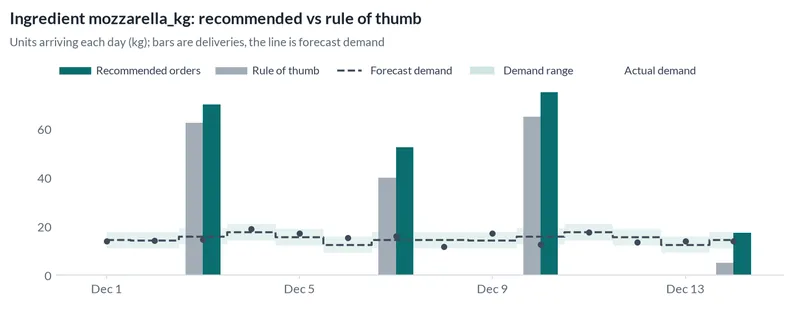
Pizza shop ingredient orders
A synthetic pizza shop: a 14-day sales forecast and a two-week order plan for dough, cheese, sauce and boxes. The rule of thumb won the reality check.
United States (synthetic) · 11.9% error · 23% better than repeating last season · synthetic data
-
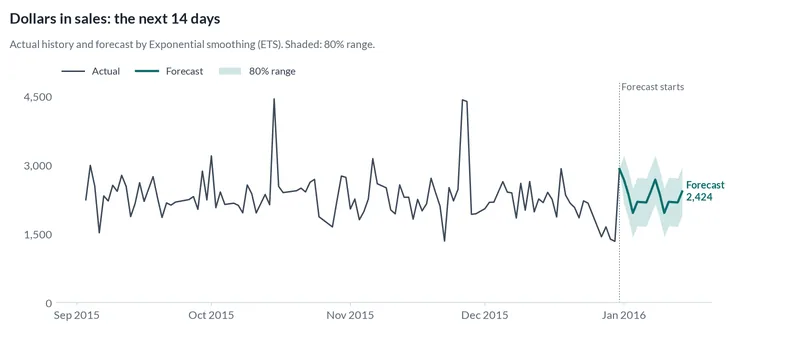
Messy POS export
The pizza dataset deliberately broken the way real exports break: four date formats, semicolons, missing days, double scans and refunds. Same engine, no hand cleaning.
United States (synthetic) · 15% error · 23% better than repeating last season · synthetic data · messy file test
Questions
My POS already shows a forecast. Why use this?
Your POS forecast is a good start if it covers what you need. We add measured accuracy on your own history, ingredient and prep quantities, and plans across locations or for things the POS does not track.
Can you forecast by hour or by menu item?
Yes, each target is its own forecast: daily totals, hourly orders or units per item. Each one is tested separately so you see which are reliable.
My export is messy. Is that a problem?
Usually not. Our messy-data examples mix four date formats, duplicate lines and refunds in one file, and the engine handles them without hand cleaning. If something is ambiguous, we ask.
Does it always beat my current way of ordering?
No, and we will tell you when it does not. In our pizza example, ordering the forecast plus 20% cost less than the plan on the two weeks we held back, and the case study shows that result.
Try it on your own data
Upload your export and describe the decision. Your first forecast is free for the first 50 businesses.
Related use cases
- Inventory reorder for wholesale distributors
Know how much to reorder of every item, every week, from the sales export you already have.
- Staffing plans for call centers and service businesses
Forecast calls, visits or jobs per day and get a shift plan that covers them at the lowest cost.